AI Generated SEO Content: A Safe, Useful Guide
You have probably stared at a blinking cursor at 9pm, knowing a blog post would help your business and knowing you will not write it tonight. That is exactly where ai generated seo content comes in. It can take a blank page and give you a working draft in minutes, which matters when you are the person answering the phone, quoting jobs, and doing the work. This guide will show you what AI can honestly do for your search rankings, what it cannot do, and the exact weekly routine our team uses to turn rough drafts into pages that bring in real enquiries. No hype, no scare stories, just a practical path you can start this week.
What AI Generated SEO Content Actually Is
A large language model is a prediction engine. It has read an enormous amount of text and learned which words tend to follow other words. When you ask it for a blog post about drain cleaning, it produces a plausible sequence of sentences about drain cleaning. It does not go and look anything up unless you give it a tool that searches, and even then it summarises what it finds.
That distinction matters more than most people realise. The model is a drafting tool, not a publishing machine. It is very good at structure, transitions, and getting words on the page. It has no idea what your actual prices are, which streets flood when it rains, or what your customers complain about most.
What It Can Know, and What It Cannot
It can know general trade knowledge. It can explain why a boiler loses pressure or how often a gutter should be cleared. It cannot know that your town sits on clay soil, that your competitor down the road closes at noon on Saturdays, or that the council requires a specific permit for certain work. Those details are the ones that make a page useful to a local reader, and they only come from you.
Why Google Rewards Pages That Help, Whoever Typed Them
Google's guidance on helpful content is about the reader's experience, not the author's identity. The question the systems try to answer is simple: does this page leave the visitor better off than they were before? If yes, it has a reason to rank. If no, it does not, regardless of how it was produced.
There is no penalty flag that fires just because text came from a model. Google has said this in plain language, and our team has watched plenty of AI assisted pages rank well when a human shaped them properly. The tool is not the problem. The output is what gets judged.
The Real Target Is Scaled Low Value Pages
What Google actively works against is mass produced pages that exist to cover a keyword rather than to help a person. Think hundreds of near identical pages spun out for every suburb name with nothing specific on any of them. That pattern is what the systems are built to demote, and AI simply makes it easier to create by accident. If you publish twenty AI drafts in an afternoon with no editing, you have built exactly the kind of site that gets ignored.
The Honest Answer on Whether AI Drafts Rank
Here is the straight answer. An unedited AI draft almost never ranks for a competitive term. It reads like everyone else's unedited AI draft because it is generated from the same broad patterns, and it contains nothing a reader cannot find on ten other pages.
An edited draft can rank, and often does. The edit is where the value gets added. When you take a generic draft and insert your actual service details, your real turnaround times, and the specific questions customers ask you, the page stops being generic. It becomes something only you could have published.
Rankings Follow Usefulness
Search engines are trying to match a query with the most useful answer available. They are not trying to detect which tool typed the words. So the useful question is never "is ai generated seo content good" in the abstract. The useful question is whether the finished page answers a real question better than what is already out there.
I would start every project by asking what the reader needs to decide or do, then work backwards to the draft. In practice this is where people get stuck, because it means the editing takes longer than the generating.
What Goes Wrong When You Publish Without Editing
The failure mode is rarely dramatic. It is a slow accumulation of small errors that make your site feel untrustworthy. Here are the problems we see most often when a business skips the editing step.
- Invented local details and fake statistics. A model will happily write that "over 70 percent of homeowners in your area" have a problem, with no source, because the sentence pattern is common. It will also name landmarks or describe weather that does not match your region at all.
- Thin pages that repeat the same idea. Without editing, five posts on similar topics tend to say the same three things in different orders. Readers notice, and so do search systems.
- Wrong specifics about your own business. Hours, prices, licence numbers, and service boundaries get guessed. One wrong price on a live page can cost you a job and an argument.
- Trust lost with customers who spot the errors. Local customers are the people most likely to catch a mistake, because they know the area. A page that gets your own town wrong tells them you did not check.
The close is simple. Every one of these problems is fixable in ten minutes of editing, and none of them are fixable after the page has been live for a month.
Best Practices for Small Business Owners Using AI
You do not need a complicated system. You need a short set of rules you actually follow, every time, even when you are busy.
- Feed the model your own service details before you ask for anything. Paste in your service list, your typical response time, and the areas you cover. The draft gets dramatically more specific when the model has real material to work from.
- Add one real example per page. A single true story about a job you did, described plainly, does more for trust than three paragraphs of general advice. It also gives the page something no competitor can copy.
- Have a human read every word before it goes live. This is the non negotiable one. The reader should be you or someone on your team who knows the trade.
- Keep the keyword in one heading, not five. Repeating the same phrase across every heading makes the page read like it was written for a machine. One clear mention in a heading plus natural use in the body is plenty.
Treat these as a checklist rather than advice. If a page fails any of the four, it is not ready. Our team runs the same list on every page we touch, and it catches most problems before they ever reach a customer.
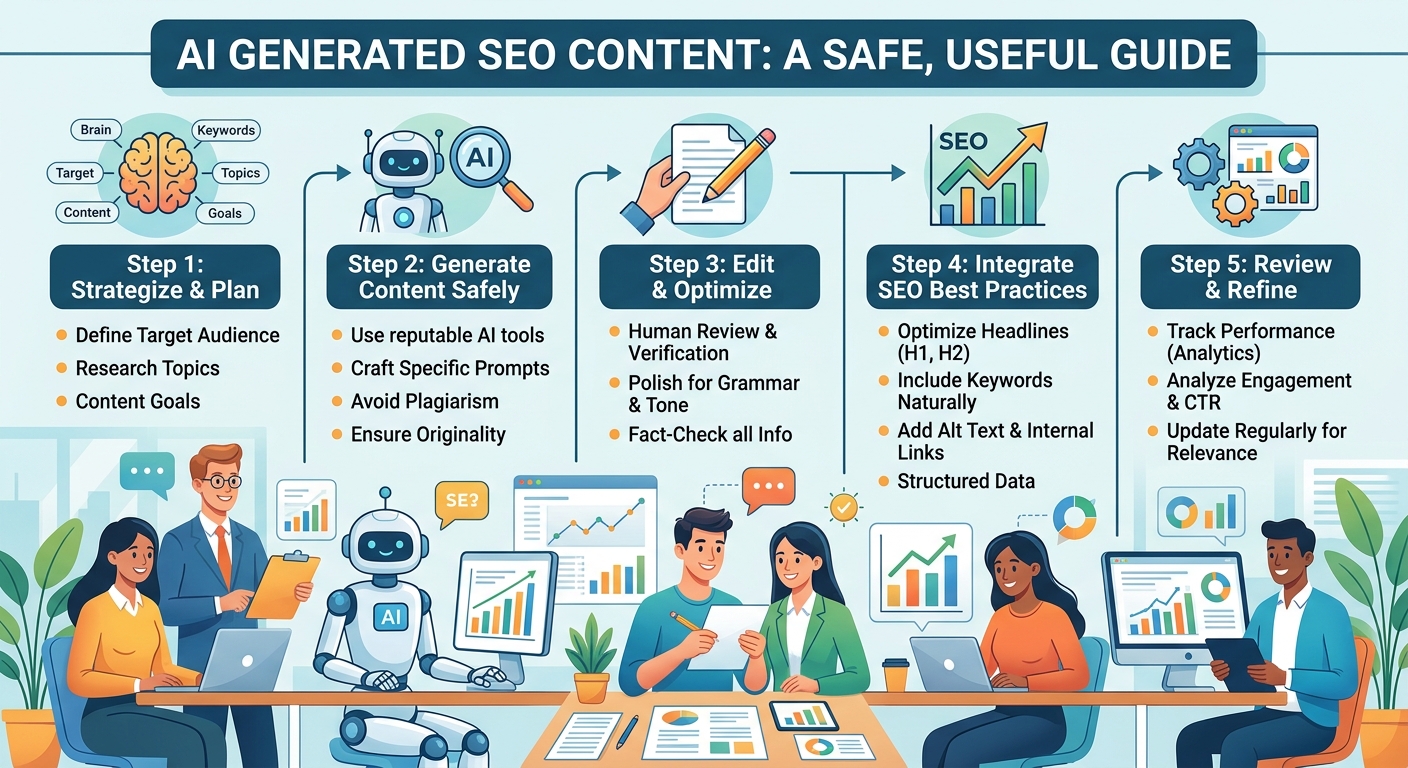
A Seven Step Weekly Workflow You Can Run
One good page a week beats five rushed ones. This routine takes about ninety minutes once you have done it a couple of times, and it fits around a normal working day.
- Pick one question a customer asked you this week. A real question from a real call is the best topic source there is, because you already know someone wanted the answer.
- Draft with a prompt that includes your town and your trade. Give the model the question, your location, and your service type, then ask for a plain language answer of around six hundred words.
- Fact check every claim against your own records. Read the draft with a pen and mark anything you cannot personally confirm, then correct or delete it.
- Rewrite the opening in your own voice. The first two sentences decide whether anyone reads the rest, and generic openings lose people fast.
- Add a photo, a price, or a local detail. A picture of your actual van, a real starting price, or a note about a local rule all work. This is the step that makes the page yours.
- Read it aloud and cut what sounds generic. If a sentence could appear on any competitor's site, it is not earning its place.
- Publish, then check Search Console in two weeks. Look at impressions and queries, not just clicks, and note which questions are starting to appear.
Then repeat next week with a different question. The compounding effect of fifty edited pages over a year is where local search visibility actually comes from.
Where AI Content Helps Most in a Local Business
Some page types respond far better to AI assistance than others. These are the ones where the drafting time saved is real and the editing burden stays manageable.
- Service area pages that need local detail. You already know the areas you cover, so the model handles the structure and you supply the specifics about each place.
- FAQ answers pulled from real customer calls. Take the five questions you answer most and turn each into a short, direct answer. This is fast and genuinely useful to readers.
- Seasonal reminders and maintenance posts. "When to book your boiler service before winter" style posts are predictable in structure, which is exactly what AI drafts well.
- Meta descriptions and title variants. These short pieces of text are tedious to write by hand and easy to check, so they are a good fit for drafting and quick review.
Notice the pattern. The best uses are pages where you hold the facts and the model holds the format. When it is the other way around, the page suffers.
Where AI Content Goes Wrong, and How to Catch It
Knowing the failure points in advance is most of the battle. Here is what to watch for, plus a quick way to catch each one.
- Wrong opening hours, prices, or licence numbers. The model guesses these because it has no access to your records. Catch it by highlighting every number on the page and confirming each one against your own information.
- Advice that ignores local rules or climate. General advice can be actively wrong in your area, whether that is a permit requirement or a frost date. Catch it by reading the advice sections as if you were the customer following them tomorrow.
- Tone that sounds nothing like the owner. A draft that sounds like a corporate brochure will not match how you talk to customers. Catch it by reading the piece aloud and asking whether you would say those words to someone standing in front of you.
- Missing or vague specifics throughout. A page with no names, no numbers, and no examples reads as filler. Catch it by counting the concrete details; if there are fewer than three, add more.
Run this list before you publish, not after. Fixing a page that has already been indexed and shared is slower and more awkward than fixing it in draft.
How to Keep AI Generated SEO Content Useful and Safe
Safety here is not about avoiding the tool. It is about keeping a human in charge of what goes out under your name. One person should own every page, meaning one person is accountable for its accuracy and its tone. When nobody owns a page, errors survive, and that is how a site slowly fills up with content nobody trusts.
Keep a source note for each factual claim. It can be as simple as a line in your notes app saying where a number or rule came from. When someone questions the page later, you can check it in seconds instead of rewriting from scratch.
Review and Measure
Review old posts when your services or prices change. A page from last year quoting an old rate is worse than no page at all, because it sets an expectation you cannot meet. A short quarterly pass over your most visited posts catches most of this.
Track rankings and enquiries, not word count. A page that brings three phone calls a month is working, even if it is short. A thousand word page that nobody reads is not, and no amount of length fixes that.
The Takeaway, the Cost of Getting It Wrong, and Your Next Step
AI drafts, and a human decides what gets published. That single sentence is the whole method. Used that way, ai generated seo content is one of the most useful tools a small business owner has picked up in years, because it removes the blank page problem without removing your judgement. Used the other way, as a publishing machine, it fills your site with pages that quietly work against you.
Bad pages cost trust you cannot buy back. A customer who reads a page with the wrong opening hours or a made up statistic does not just leave the site. They remember that you were careless, and they tell the person who asks them for a recommendation. That cost is far higher than the hour you saved by skipping the edit.
Your Next Step
Start with one page this week and edit it properly. Pick a question you answered on the phone today, draft it with your town and trade included, then work through the fact check and the read aloud pass. Publish it, and check back in two weeks to see what it is doing. If you would rather hand the whole routine to someone who runs it every day, our team at HaloSEO does exactly that for local businesses, and we would be glad to talk it through.
Recommended reads
- Automated SEO Plugin: What It Can and Cannot Do
- Automated SEO WordPress: Put Your Blog on Autopilot
- Content Automation SEO That Grows Traffic
More from HaloSEO
- See pricing
- Start a trial