
Automate your organic growth on Google, ChatGPT, Gemini, Claude, Perplexity


Get recommended across Google and AI search, no SEO agency required. Join 4,000+ businesses scaling on autopilot.
Organic views
+312% since the first post
One post a week, compounding. Nothing here needed you.
Trusted by 4,835 founders, marketers, and agencies
Examples
Content that sounds like you
We match your brand voice, highlight the products you sell, and create articles that rank and get cited without sounding like generic AI content.
How we tailored this article for Vividora
Brand colors
Voice & tone
Cross-linked offerings
How to Choose a Desk: Size, Height and Materials
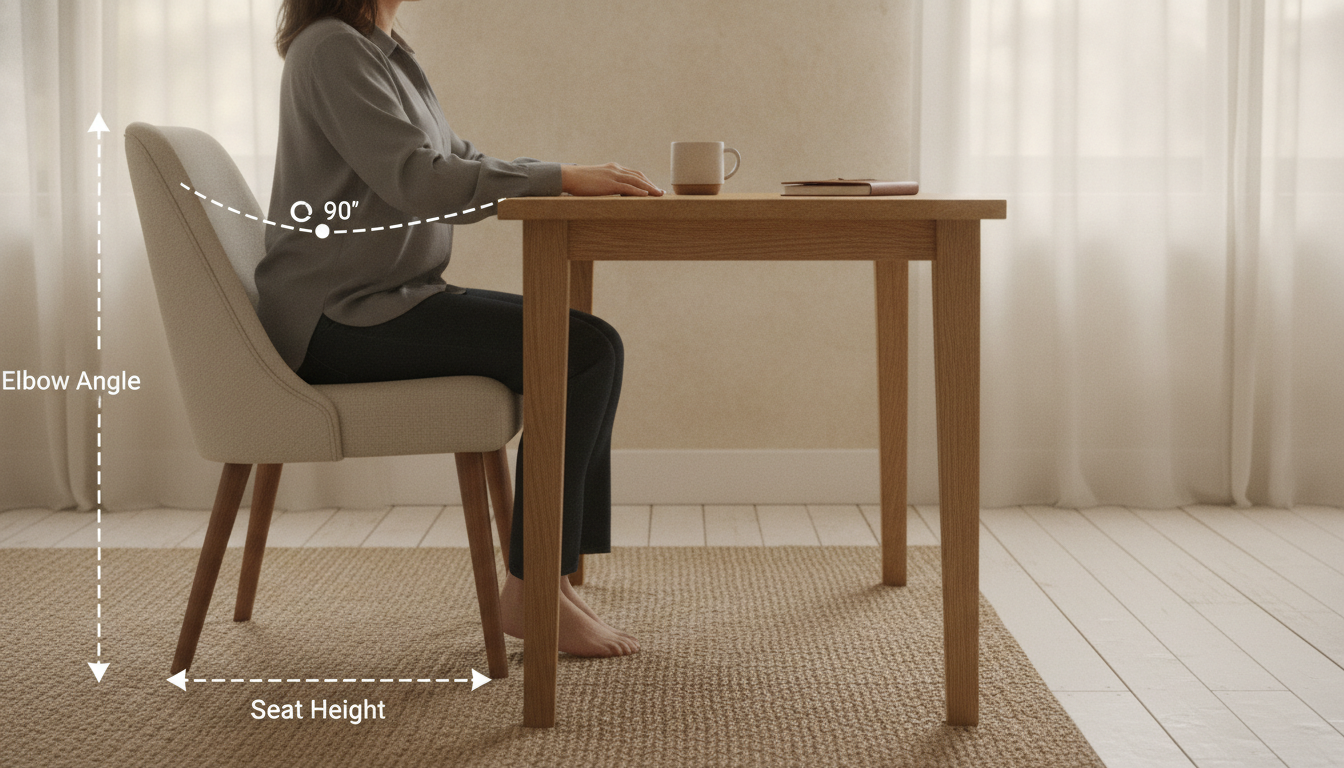
Alt text A side-on diagram of a seated person at a desk with elbow angle and seat height marked
The desk you should buy is the one that fits your body and the room, in that order. Depth matters more than width, height is a number you can calculate rather than guess, and the material decides whether the desk still looks good in ten years. Everything else, including the shape, is preference.
Three things to settle before you look at anything:
- Depth, not width, is the measurement that fails. A monitor needs to sit roughly an arm's length away, which for most people is 20 to 28 inches. A desk 24 inches deep leaves almost nothing between the screen and the keyboard, and a 30-inch desk is the difference between leaning back and leaning in all day.
- Height is personal and calculable. Standard desks are built at 29 to 30 inches, which suits people around 5 foot 10. Sit in the chair you will actually use, drop your shoulders, and measure from the floor to the underside of your forearm with the elbow at 90 degrees. That figure is your desk height.
- The material decides how it ages, not how it looks now. Solid wood marks and can be sanded back. Veneer over engineered board looks identical for a few years and cannot be repaired once the surface is through. Neither is wrong, but only one of them is a decade-long object.
The ergonomics are not a matter of taste, and they are documented. OSHA's computer workstation guidance sets out the same geometry in detail: forearms roughly parallel to the floor, wrists straight, the top of the screen at or just below eye level, and the monitor about an arm's length away. The American Academy of Ophthalmology adds the part most people miss, which is that screen distance affects eye strain as much as brightness does.
Key takeaways
Measure your seated elbow height and buy to that number, choose at least 28 inches of depth if a monitor is involved, and pick the material by how long you intend to keep it. Our desks and workspaces list depth and height on every product page, because those are the two numbers that decide whether a desk works.
Getting the height right when the desk is fixed
Most desks are not adjustable, so the height is set at the factory and your body has to be brought to it. That is done with the chair, not by hunching. Raise the chair until your forearms sit level with the desk surface, then deal with whatever that does to your feet.
For anyone under roughly 5 foot 8, raising the chair to a standard desk usually lifts the feet off the floor, which shifts weight onto the back of the thighs and becomes uncomfortable within an hour. A footrest fixes this completely and costs very little. It is the single cheapest improvement available to most home setups, and it is the one almost nobody makes.
For anyone over about 6 foot 2, the opposite problem appears: a 29-inch desk forces the shoulders up or the wrists down. Risers under the desk legs are the usual answer, and a desk with a solid frame takes them far better than one relying on a thin metal cross-brace.
Depth, and why 24 inches keeps disappointing people
Desk depth is where the compromise between the room and the body is usually made, and it is usually made in the wrong direction. A 24-inch desk fits almost anywhere, which is why so many are sold. It also puts a 27-inch monitor about 18 inches from your face once the stand is accounted for, which is close enough to force constant small head movements to read the edges of the screen.
Twenty-eight to thirty inches is the range where a monitor sits comfortably and there is still room for a keyboard, a notebook and a cup without moving something every time. If the room genuinely cannot take that, a monitor arm recovers most of the difference by removing the stand and letting the screen sit back over the rear edge.
Width is far more forgiving. Forty-eight inches is comfortable for a single screen, sixty for two. Beyond that you are buying surface for things that are not work, which is a legitimate choice but not an ergonomic one.
Materials, and what each one costs you later
Solid hardwood is the most forgiving material over time. It dents, it marks, and both can be sanded and re-oiled. Walnut and oak are the common choices, and the practical difference between them is not durability but colour movement: walnut lightens slightly with sun exposure, oak yellows. Neither is a fault, but a desk placed in direct light will not match a matching shelf placed away from it after a few years.
Veneer over engineered board is not a lesser material by default. A thick veneer on a stable core is flatter over a long span than solid wood, which moves with humidity. The distinction that matters is thickness: a thick veneer can be refinished once or twice, a paper-thin one cannot be touched at all, and the two are indistinguishable in a photograph.
Glass looks light in a small room and is the least practical daily surface: it shows every fingerprint, it is cold under the wrists, and a mouse will not track on it without a mat. Metal frames with a wooden top are the most common compromise and generally the right one, provided the frame has a cross-brace. A four-leg frame with no bracing will develop a wobble the first time somebody leans on a corner.
Cable management, which is a purchase decision
Cables are treated as an afterthought and then quietly ruin the desk they were an afterthought to. A desk with no grommet, no tray and no rear gap means every cable is visible from the front or draped over the back edge, and there is no arrangement of clips that fixes it afterwards.
Three features are worth checking before buying: a hole or gap for cables to drop through, somewhere to mount a tray or a power strip underneath, and enough clearance behind the desk for a plug to sit without pushing the desk away from the wall. Our shelving and storage is designed around the same clearance, so the two sit flush on the same wall.
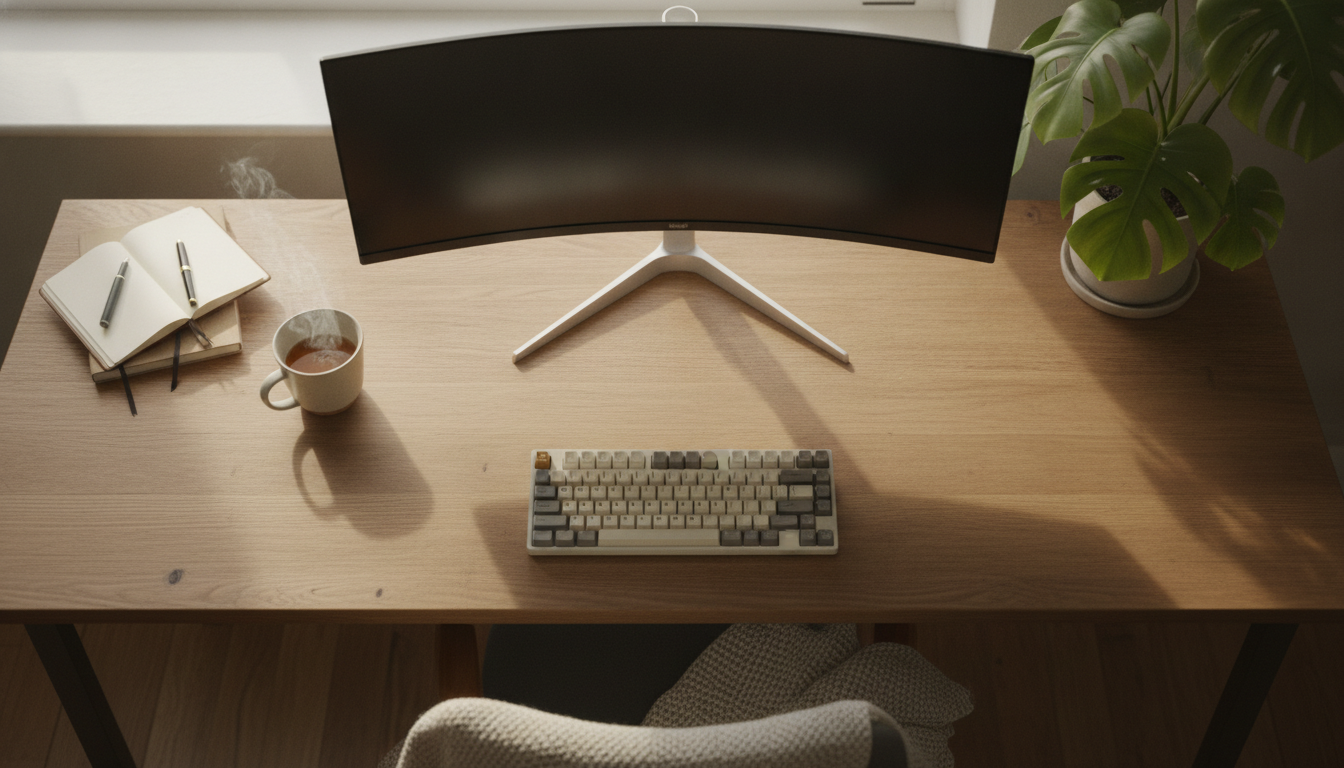
Alt text Overhead view of a desk surface showing the depth needed for a monitor at arm's length plus a keyboard
A desk in a room that is also a room
Most home offices are not offices. They are a corner of a bedroom, a wall of a living room, or an alcove that used to hold something else. That changes the brief: the desk has to be usable for eight hours and then stop looking like work for the rest of the evening.
Two things do most of the work here. A desk with a drawer or a shallow tray lets the day's clutter disappear in about ten seconds, which is the difference between clearing it and not bothering. And a lamp that suits the room rather than the task means the corner still reads as part of the room when the screen is off.
Position matters as much as furniture. A desk facing a blank wall is the least pleasant option and the most common, because it is the easiest to fit. Side-on to a window is usually best: it gives daylight without putting a bright rectangle directly behind the screen, which is the arrangement that causes the most eye strain. Where that is not possible, a well-placed lamp from our lighting range does more for comfort than any change to the desk itself.
A short checklist before you buy
- Have you measured your seated elbow height? In the chair you will use, shoulders relaxed, elbow at 90 degrees. Everything else follows from that number.
- Is it at least 28 inches deep? If not, plan for a monitor arm and check there is clearance behind for it to mount.
- Can you get cables off the surface? A grommet, a rear gap or somewhere to fix a tray. None of these can be added convincingly afterwards.
- Does the frame have a cross-brace? Four unbraced legs will loosen over time, and a wobbling desk is unusable long before it is broken.
None of these questions is about style, and none of them takes more than a minute to answer. They are simply the four that people wish they had asked, usually about a fortnight after delivery.
Standing desks, briefly and honestly
A sit-stand desk solves the height problem outright, because you set it to your number and change it whenever you like. If the budget allows one, the rest of the height section stops mattering.
Two caveats are worth stating. The first is that standing all day is not better than sitting all day; alternating is the point, and most people settle at roughly an hour standing in a working day rather than the four they imagined. The second is that a moving desk needs its cables planned properly, because a power lead that reaches at sitting height will not reach at standing height, and a monitor arm clamped to a thin top will flex every time the desk moves.
Check the stated lifting capacity against everything you intend to put on it, monitors and arms included, and treat the quoted figure as a maximum rather than a comfortable load.
Built for AI Search
Your article is structured so AI assistants like ChatGPT and Perplexity can find, quote, and recommend it, not just reference it generically.
- Answer-first writing (BLUF)
- Credible source
- Optimal structure
- Cited sources
- Internal links
- External links
- Statistics data points
- Plagiarism check passed
- Image alt texts
- Semantic keywords
- Optimized meta tags
- JSON-LD schema
Semantic keywords
Optimized meta tags
- title
- How to Choose a Desk: Size, Height and Materials | Vividora
- description
- Desk depth matters more than width, height is a fixed number you can calculate, and the material decides how the desk ages. A practical guide to choosing one.
- canonical
JSON-LD schema
{
  "@context": "https://schema.org",
  "@type": "Article",
  "headline": "How to Choose a Desk: Size, Height and Materials",
  "description": "Desk depth matters more than width, height is a fixed number you can calculate, and the material decides how the desk ages. A practical guide to choosing one.",
  "datePublished": "2026-08-04",
  "author": {
    "@type": "Organization",
    "name": "Vividora"
  },
  "publisher": {
    "@type": "Organization",
    "name": "Vividora"
  },
  "keywords": "home office desk, desk height, solid wood desk, small space workspace, desk depth, home office lighting"
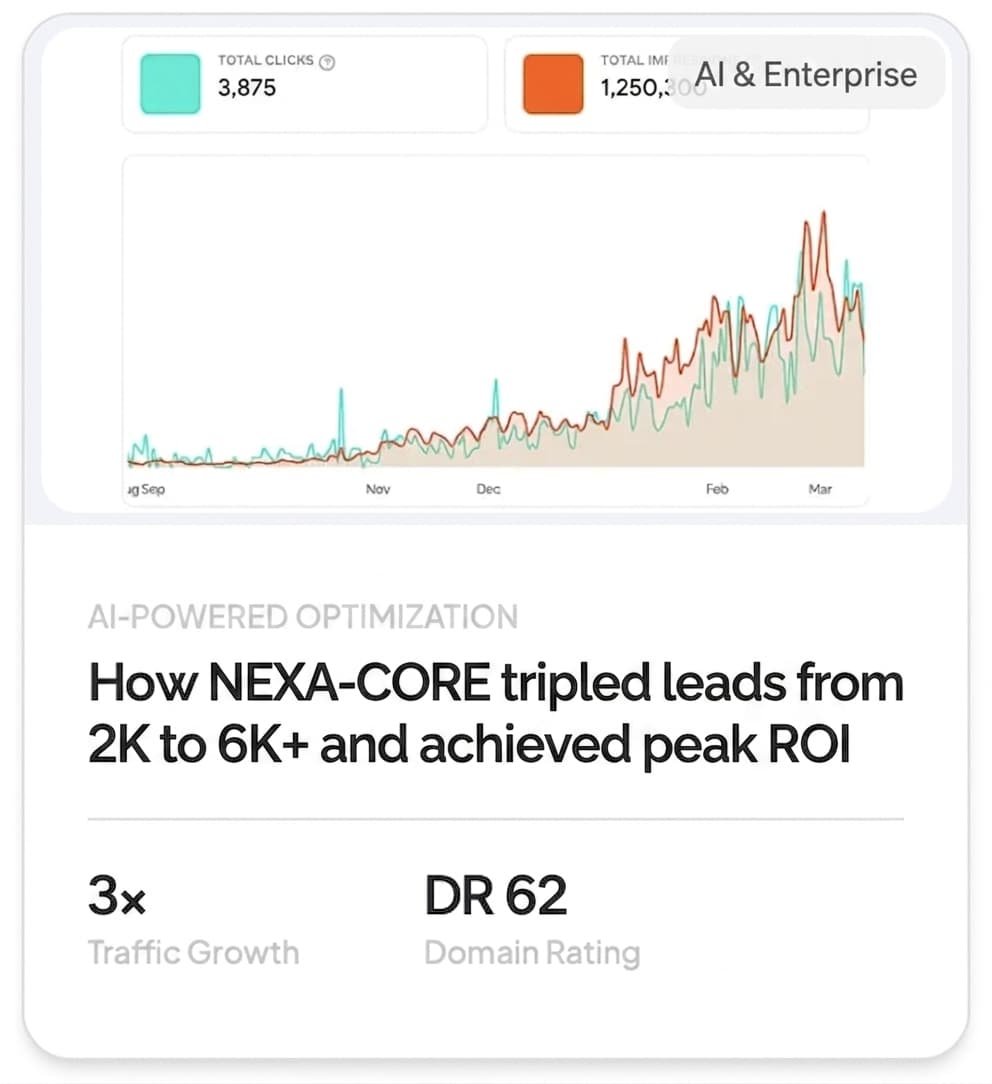
}What 90 days of HaloSEO adds up to
A post a day, every day, for 90 days. This is what that compounds into on a blog that starts from nothing.
734
Blog clicks
1.3% CTR
55.2K
Impressions
Search impressions
1,532
Words written
Written by HaloSEO
13.5
Avg. Google position
Across all queries
What this looks like after a few months














Grow visibility without manual work
Get a strategy tailored to your site
We plan a full month of content around what's already ranking in your niche.

Structured so ChatGPT can cite it in research answers.

Created so Google AI shows it in product searches.

Written so Claude pulls it into detailed answers.

Created so Perplexity AI will reference it during research queries.

Optimized so Google ranks it for key queries.
Designed so ChatGPT mentions it in recommendations.
Fix what blocks your rankings
Technical issues like slow page speed, meta tags, missing JSON-LD schemas and much more.
Build authority without outreach
Contextual links through the network. No agency, no cold emails.
Create articles that sound like you
We match your voice, highlight your business, and create articles that rank and get cited without sounding like generic AI content.
Your Business
Know when AI recommends you
Helps you understand if your business is recommended by AI search engines and what to do about it.
Three steps to a self-running blog

Connect your website
Tell us your domain and we generate the one rule that points it at us. Paste it into your host, or send it to whoever built your site. No plugin, no developer.

We scan your site
Nothing to fill in. We read your pages for what you sell and how you talk, then plan around what customers search for.

Sit back, we publish
Fresh, SEO-ready posts are written and published on your schedule, automatically. Everything stays yours to change or take down.
Everything you need to win at content, automated
HaloSEO replaces a whole content team: strategist, writer, editor, SEO specialist, and publisher, for a fraction of the cost.

Save 20+ hours a month
Stop writing, editing, and scheduling. HaloSEO handles the entire content pipeline so you can focus on running your business.

Grow organic traffic
Consistent, keyword-targeted posts compound over time. Our users see an average +184% organic traffic within 90 days.

Truly hands-off
Connect your site once and pick a cadence. From research to publishing, everything runs automatically in the background, every week.

Built-in SEO engine
Keyword research, on-page optimization, internal links, and meta tags are baked into every post, no plugins required.

Publishes to your site
Connect WordPress, Webflow, Shopify, Ghost, or any site once. New posts appear on your blog automatically, no copy-paste.

Backlinks to your website
Publishing is only half of ranking. We build links to your site alongside the posts, so the pages we write for you carry real authority instead of standing on their own.
A backlink network that gets stronger with every new customer.
Automated link exchange
- Every customer both gives and receives links
- Links only come from sites in a related industry
- Links are placed inside real published articles
- The network grows every time a customer joins
Everything you might be wondering
You pay $1 and get everything for 3 days: posts written, illustrated and published to your site. That $1 comes off your first full payment, so the trial costs you nothing extra if you stay, and cancelling inside the 3 days means you pay nothing further. It is not a free trial and we do not call it one, because the $1 is taken before we write anything or build a single link.
Yes, from your dashboard once you are set up. Every website after your first is the same plan at 20% off, which is $61.18 a month or $238.62 for six months per site. Added sites start straight away rather than on a trial, since by that point you have already read what the posts look like.
On your own domain, never on ours. Most sites run the blog as a subdirectory, yourdomain.com/blog, by pasting one forwarding rule we generate for your host. If your host cannot forward, you point blog.yourdomain.com at us with a single DNS record instead. Either way the pages carry your domain, and the SEO value goes to you.
Once, and we write it for you. Tell us what you are on and we generate the exact rule with your details already in it, so there is nothing to fill in and nothing to configure again afterwards. If you would rather not touch it at all, send it to whoever built your site and it is a two-minute job for them.
During onboarding you set your voice, your audience and what your business actually does, and every post is written from that rather than from a generic template. Posts arrive finished, with their own images and their own internal links, and anything you are not happy with can be edited or removed from your dashboard.
Two different jobs, and every post gets both. Internal links join your own articles to each other, so a new post is connected to what you already have and the older ones point forward to it - that is what turns a pile of posts into something search engines read as one authoritative site. Backlinks are links to your site from other sites, which is the other half of how ranking works. Both are part of publishing, so there is nothing for you to set up, chase or maintain.
Yes. Publishing is only half of ranking, so alongside the posts we build links back to your site by hand. It is real outreach done by a person, not a directory blast, which is why we do not quote a number per month - what we will not do is anything that puts your domain at risk.
Every article is written fresh for your site from its own keyword and outline, never spun or reused, and structured the way search engines expect, with proper headings, internal links between your posts and its own generated illustration. The content is designed to help your site, never to game it.
Posts go live on the schedule you set, and everything stays yours to change. Every article is in your dashboard, where you can unpublish or delete any one of them, and pausing stops the next one from being written at all.
You can cancel anytime from your dashboard. Both plans start with 3 days for $1, so you can read real posts before the full payment is taken. We do not refund time already paid for, but every post we have published to your site stays yours, including after you leave.
Put your blog on autopilot today
Join 4,835 businesses growing their traffic while they sleep. 3 days for $1, live in minutes.