Automated SEO Plugin: What It Can and Cannot Do
You have a website, a phone that will not stop ringing, and a to-do list that already runs past closing time. Somewhere on that list is "do something about SEO." You have heard an automated seo plugin can handle it for you, and you are wondering if that is true. This post will help you understand what these tools actually do, what they cannot do, and how to decide whether a plugin, a service, or a mix of both fits your business. No jargon, no hype, just a clear look at the options so you can stop guessing and pick a direction.
What an Automated SEO Plugin Actually Does
An SEO plugin is a piece of software you install on your website, most often on WordPress, that handles the technical setup search engines look for. It is built for people who can run a business but do not want to learn how search engine crawlers work. You install it, answer a few setup questions, and it starts working in the background.
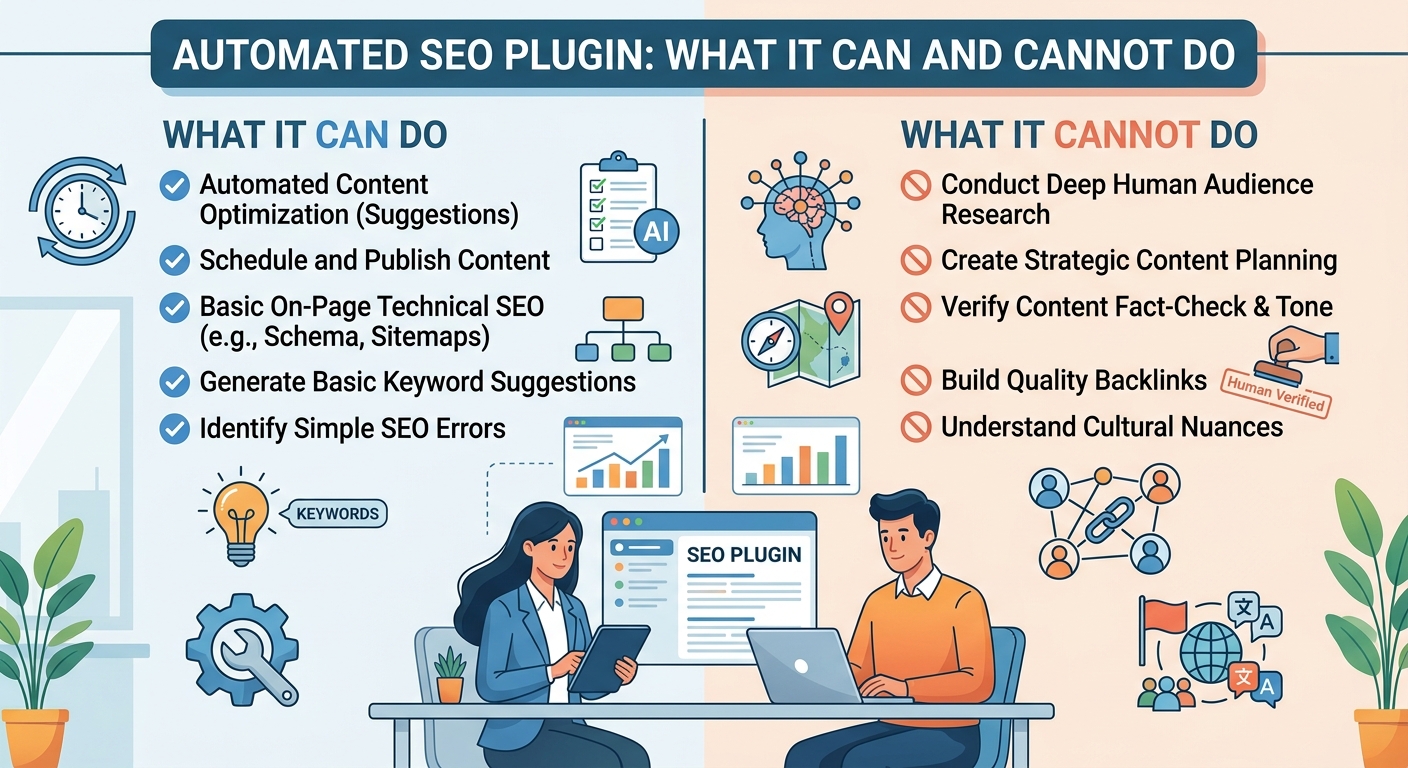
The tasks it automates are specific and mostly invisible to your customers. It writes meta tags, which are the title and description that show up in search results. It generates an XML sitemap, a file that lists your pages so search engines can find them. It adds schema markup, which is code that tells search engines "this is a local business" or "this is a review." It manages redirects when you move a page. It can even suggest alt text for images, which is the written description that helps with accessibility and image search.
Here is the part that matters most. Technical SEO is the plumbing. Content SEO is what you actually say to your customers. A plugin handles the plumbing. It does not write the words on the page, and it does not know what your customers care about.
That distinction is where most confusion starts. A plugin can make your site easy for Google to read. It cannot make your site worth reading. Those are two different jobs, and only one of them can be automated.
The Two Layers, Side by Side
Think of it like a storefront. Technical SEO is the sign, the address, and the unlocked door. Content SEO is what is on the shelves and whether people want to buy it. A plugin fixes the sign and the door. It will not stock your shelves.
Where Plugins Win and Where They Quietly Fail
Plugins earn their place on almost every small business site. They also get blamed for problems they never promised to solve. Here is where they help and where they fall short.
- They are fast and consistent. A plugin applies the same technical rules to every page in seconds, which is something no human wants to do by hand.
- They are cheap. Most cost less than a single hour of a consultant's time, and they keep working while you sleep.
- They cannot understand your customers. A plugin does not know that your best customers ask about turnaround time, parking, or payment plans, so it cannot write for them.
- Auto-generated content often reads like filler. When a tool writes paragraphs for you, the result tends to be generic, repetitive, and obvious to both readers and search engines.
- The gap between "technically optimized" and "actually useful" is where most small business sites get stuck. The plumbing is perfect and the site still gets no traffic.
In practice this is where people get stuck. They install the plugin, see green checkmarks, and assume the work is done. Green checkmarks mean the technical layer is clean. They do not mean anyone wants to read your pages.
I would treat a plugin as the foundation, not the house. It is necessary and it is not enough. The moment you expect it to bring in customers on its own, you have handed it a job it was never built for.
Do SEO Plugins Automate Content? The Honest Answer
This is the question we hear most, and the honest answer is no, not in any way that helps you. Plugins can suggest keywords, generate meta descriptions, and score your readability. Some will draft a title tag for you. None of them write a full article that sounds like your business and answers a real customer question.
AI writing tools are a separate category. They can produce text, and some are genuinely useful for outlines or first drafts. They are not SEO plugins, and treating them as the same thing leads to bad decisions. A tool that generates 2,000 words on "plumbing services" has no idea what your customers actually search for.
Why This Matters for Local Searches
Local queries are specific. Someone searching for a service near them wants hours, availability, pricing signals, and proof you serve their area. Auto-generated content rarely matches that intent because it was never written with a real person in mind. It fills space.
The risk is real. Publishing thin, generic pages can get them ignored, and in worse cases it can drag down how the rest of your site is judged. You end up with more pages and less traffic, which is the opposite of what you wanted.
My honest position: use automation for the technical layer and keep a human in the writing layer. That is the split that holds up over time.
Picking a Plugin That Fits Your Platform and Your Time
The best automated seo plugin is the one that fits your platform, your skills, and your willingness to write. There is no single winner, so work through these steps in order.
- Start with your platform. If you run WordPress, you have the widest choice, and an automated seo plugin for WordPress will cover the most ground with the least setup. On other platforms, your options shrink, so check compatibility before you compare features.
- Check what it automates versus what it leaves to you. Some tools handle everything technical and ask nothing of you. Others require you to write titles, descriptions, and focus keywords for every page. Know which one you are buying.
- Look for schema support, sitemap generation, and readability checks. Those three cover the technical basics and give you feedback on your writing without pretending to do it for you.
- Avoid plugins that promise to write content for you. That promise is the clearest sign the tool is overselling. Technical automation is reliable. Content automation is not.
- Test one plugin at a time. Two plugins doing the same job can conflict, duplicate tags, or break your sitemap. Add one, watch it for a couple of weeks, then decide.
Run through that list before you install anything. It takes twenty minutes and saves you months of cleanup later.
SEO Plugin vs SEO Service: Which Fits Your Situation
This comes down to one question: do you have time to write? If yes, a plugin plus your own writing is a strong, low-cost setup. If no, a plugin alone will leave your site technically clean and completely invisible.
A plugin fits you if you enjoy writing or can carve out a few hours a month. You handle the content, the plugin handles meta tags, sitemaps, and schema, and you keep your costs low. This works well when your market is not crowded and you publish consistently.
A service fits you if writing keeps sliding down your list. You need someone to plan topics, write the pages, and connect it all to a strategy. That costs more money and saves you the time you do not have.
The Hybrid Route Most Owners Land On
Many businesses run both. The plugin keeps the technical layer healthy, and a writer or service produces the content. This is usually the most practical setup because each side does what it is good at.
Cost is a trade of time for money. A plugin is a small recurring cost and a real time commitment from you. A service is a larger cost and almost no time commitment. Neither is wrong. They just buy different things.
Decide based on two factors: how often you can realistically publish, and how competitive your market is. If you can publish monthly and your market is quiet, a plugin may be enough. If your competitors publish weekly and you cannot keep up, you need help with content.
Common Mistakes When Relying on an Automated SEO Plugin
Most problems we see are not caused by bad plugins. They are caused by how people use them. Watch for these.
- Enabling every automation without reviewing the output. A plugin can generate dozens of meta descriptions in a minute, and some of them will be awkward or wrong. Skim them.
- Assuming the plugin knows your business better than you do. It does not know your services, your service area, or your customers. You do.
- Ignoring local SEO signals the plugin cannot set for you. Your business name, address, phone number, hours, and service area need to be consistent everywhere, and that is on you.
- Never updating content after the initial setup. Pages go stale. Services change. Prices shift. Old content quietly stops working.
- Expecting rankings without publishing anything new. Technical setup helps search engines find you. New, useful content is what gives them a reason to rank you.
The pattern here is simple. Plugins reward attention. Set it, forget it, and you get a clean site with no visitors.
What to Do Next If You Want SEO Handled for You
The takeaway is straightforward. An automated seo plugin handles the technical layer well, and content plus strategy still need a human who understands your business. That is not a flaw in the tools. It is just the shape of the work.
The stakes are worth naming. If you ignore this split, you pay for a plugin every month while your site sits invisible, and the customers you could have reached go to someone else. That is a slow, quiet leak.
If you would rather not carry the content side yourself, bring the problem to a team that handles both. At HaloSEO, our team takes care of the technical setup and the writing, so you get a site that is easy to find and worth reading. That is the whole job, and you can get back to running your business.
Recommended reads
- Automated SEO WordPress: Put Your Blog on Autopilot
- Content Automation SEO That Grows Traffic
- 7 Small SEO Tools That Do the Heavy Lifting
More from HaloSEO